Two things, not one. The date and time written into the picture itself, so they survive being forwarded, screenshotted or re-saved, and the same date, time and position written into the file's EXIF data, which a computer or a claims system reads. When the visible stamp and the hidden metadata agree, the photograph is far harder to argue with than either alone.
Why an ordinary photo is weak
You photograph the scratch on the hire car before you drive off. Six weeks later the rental company bills you for it. You send the photo. The reply is: when was this taken?
And on an ordinary photograph, that turns out to be a surprisingly hard question to answer.
- The picture itself carries no date. Nothing in it says when.
- The file's EXIF data does, but most messaging apps strip it out on the way. What arrives is a clean image with no history.
- A screenshot of a photo has no original metadata at all — only the moment the screenshot was taken.
- EXIF can be edited. Free software will change a date in seconds, which the other side knows.
- “It's in my camera roll” means showing somebody your phone, which is not something you can put in an email.
What gets stripped, and where
| Sent how | Date & GPS survive? | Notes |
|---|---|---|
| WhatsApp, as a photo | No | Re-encoded and stripped |
| WhatsApp, as a document | Usually | Sent as the original file, but few people do this |
| Most social platforms | No | Stripped on upload, as a privacy measure |
| Email attachment | Usually | The most reliable everyday route |
| A screenshot of the photo | Never | New file, new date, nothing of the original |
| Printed out | No | Unless the date is visible in the picture |
Read down that table and the conclusion is uncomfortable: the metadata you are relying on is the first thing thrown away, usually by the app you were always going to use.
Which is why the stamp goes in the picture
A stamp burnt into the corner of the image is part of the photograph. It goes wherever the photograph goes — through WhatsApp, into a claim form, onto a printed page, into a screenshot of a screenshot. It cannot be stripped without visibly altering the image.
It should say enough to be checkable:
The seconds matter more than people expect. “About two o'clock” is a recollection; 14:32:07 is a record. So does the accuracy figure: saying the phone was confident to within five metres is more credible than a bare coordinate pretending to be perfect.
The restriction is the point. A stamping app that lets you import an old photograph and add any date you like has produced a picture that proves nothing, because anyone can do the same. A stamp is only worth something if the app physically cannot make a false one: the time comes from the phone at the shutter, the app has no editing of it, and nothing can be imported from the camera roll.
When people actually need this
The app
Taken At is a camera with one button. There is nothing to set up and nothing to type. The stamp appears on the camera exactly as it will be written, with the clock ticking, so you see what you are getting before you press. Every photograph is stamped and kept the moment it is taken.
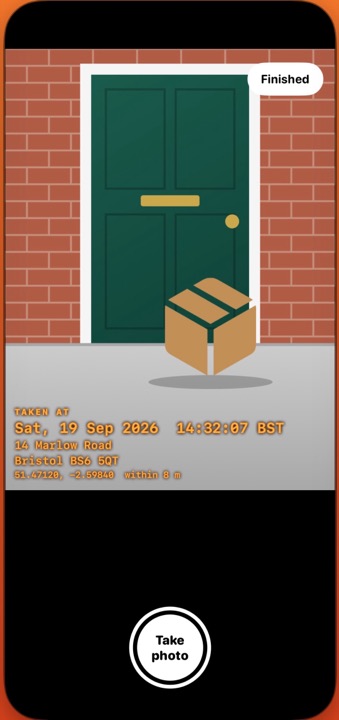
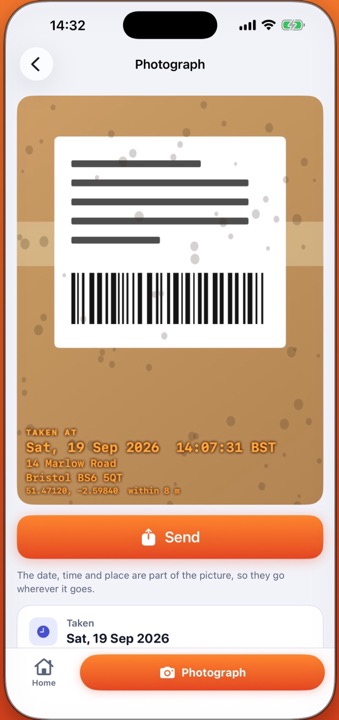
The date, time and place go into the file's EXIF as well as into the picture, so both always say the same thing. With no signal the date and time are still stamped and the place goes on as coordinates. If you would rather no place appeared at all, that is one switch.
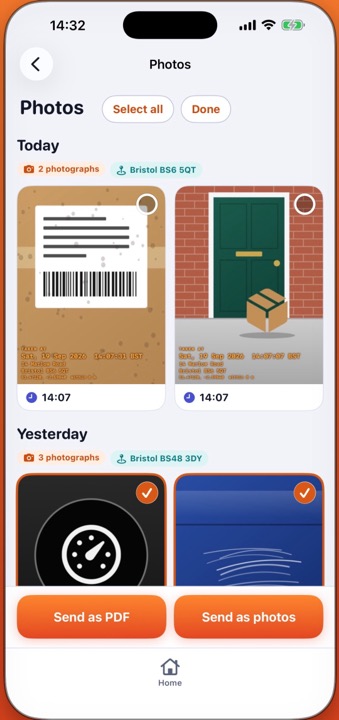
Sending is the iPhone's own share sheet. Tick the photographs you need and send them as a PDF, two to a page on A4, numbered, each with its stamp and its details in words beside it — a dozen photographs make a file small enough to email.

Taken At: Timestamp Camera
Ten photographs free with everything working, then one purchase and no subscription. iPhone. Backs up to your own iCloud, never to us. Not released yet — this page is here so it can be found when it is.
Coming soon to the App StoreQuestions people ask
- Does WhatsApp really remove the date?
Yes, when sent as a photo. Send it as a document instead and the original file goes through intact — but you cannot control how the other side forwards it on.
- Is a timestamped photo legal proof?
No photograph is proof by itself, and nothing here can promise the outcome of a claim. What it does is make your account specific, checkable and clearly made at the time.
- What if there is no phone signal?
The date and time always go on. The place goes on as coordinates if the phone has a fix, and is left off if it does not.
- Can I stamp a photo I already took?
No, deliberately. Only the app's own camera can add a photograph.
- Can I turn the location off?
Yes, one switch in Settings. The date and time stay.
- Is there an Android version?
No. It is an iPhone app.
Taken At records what your phone saw, when and where. It cannot promise the outcome of any dispute or claim, and this page is general information rather than legal advice.